OSEPP UNO R4 Plus ATMEGA328P Microcontroller Board
$ 31.62
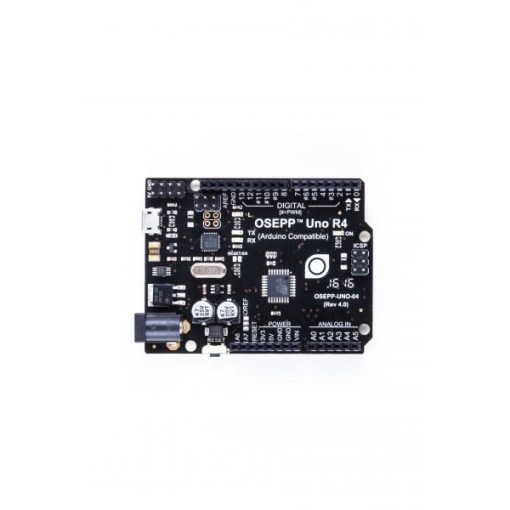
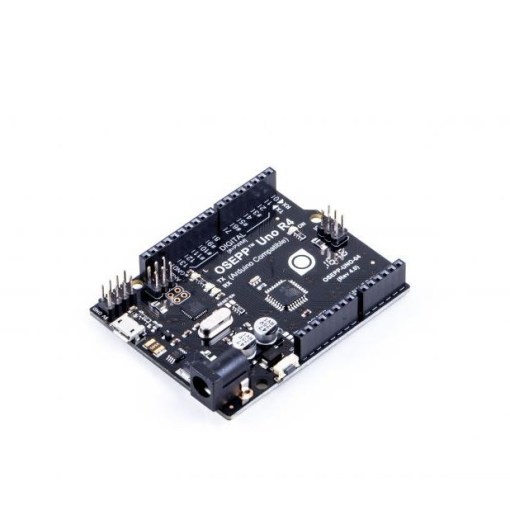
& Free Shipping: UK £40 | EU £50 | Intl £55OSEPP UNO-04 UNO R4 Plus ATMEGA328P Microcontroller Board The OSEPP UNO R4 Plus ATMEGA328P Microcontroller Board stands as a robust and versatile microcontroller platform, building upon the foundational design of the Arduino Uno while incorporating modern enhancements for improved usability and functionality. Manufactured by OSEPP, a provider of accessible electronics for makers, educators, and hobbyists, this board centers around the Atmel ATmega328P, an 8-bit AVR RISC-based microcontroller renowned for its efficiency and widespread adoption in embedded systems. Preloaded with the Arduino bootloader, it enables seamless programming via the Arduino Integrated Development Environment (IDE), allowing users to upload sketches directly through a micro USB connection, which replaces the outdated mini-USB found in earlier models for better compatibility with contemporary cables and devices. Features: Powered by ATmega328P microcontroller with preloaded Arduino bootloader for easy programming. Micro USB connector for modern connectivity and data transfer. Additional analog input pins A6 and A7 for expanded sensor capabilities. Extra 5V and GND power pins for simplified power distribution. Dedicated 4-pin latchable I2C connector for seamless module integration. ICSP header for in-circuit serial programming of the ATmega328P. Resettable polyfuse on USB line for overcurrent protection up to 500mA. Fully compatible with Arduino Uno shields and software libraries. Specifications: Microcontroller ATmega328P Clock Speed 16 MHz Flash Memory 32 KB SRAM 2 KB EEPROM 1 KB Operating Voltage 5V Input Voltage 6-12 V Digital I/O Pin Count 14 (including 6 for PWM output) Analog Input Pin Count 8 Other Connections micro-USB ICSP for ATmega328p DC power connector 4-pin latchable I2C connector Dimensions 2.95 x 2.13 x 0.61 inches (75.0 x 54.0 x 15.5 mm) Power Source USB or external DC power supply Applications: Educational programming and electronics labs. Prototyping IoT devices and sensor networks. Motor control and robotics projects. Data acquisition and display systems. Home automation controllers. Shield-based expansions for audio or displays. Embedded firmware development. Learning Center: What You Need Arduino Software (http://arduino.cc/en/Main/Software) USB-to-mini-USB PC/Mac with a USB port Uploading Your First Sketch Get the Arduino software if you have not already Download from http://arduino.cc/en/Main/Software Unzip the zip file to somewhere like C:\ (on Windows), so you will end up with a folder like C:\arduino-0022 Prepare for serial communication Connect the USB-B end of the cable into the board Connect the other end of the cable into a USB port on your PC/Mac If your computer prompts for drivers, point it to the “drivers\FTDI USB Drivers” subfolder of the Arduino software, e.g. “C:\arduino-0022\drivers\FTDI USB Drivers” You should now see the LED labeled ON near the reset button light up Load the sketch Open the Arduino software Open the LED blink sketch: File menu > Examples > Basics > Blink Select the Arduino/Genuino Uno: Tools > Board > Arduino/Genuino Uno Select the serial port: Tools > Serial Port. This is the serial port for the board’s built-in FTDI. If you do not know which one this is, you can find out by going into Device Manager > Ports (COM & LPT), and look for a “USB Serial Port (COMx)” Upload the sketch: File > Upload to I/O Board Wait for the “Done uploading” message in the bottom blue status bar The LED labeled L near pin 13 should now blink slowly Congratulations! You have successfully uploaded your first sketch to your board. Alternative Install Guides Windows : http://arduino.cc/en/guide/windows Mac : http://arduino.cc/en/guide/macOSX Linux : http://playground.arduino.cc/Learning/Linux Also the main Arduino page has troubleshooting guides for the basic errors encountered : http://arduino.cc/en/guide/troubleshooting Package Include: 1x OSEPP UNO-04 UNO R4 Plus ATMEGA328P Microcontroller Board Documents: OSEPP Uno R4 Schematic